Skip to content
Bay East Association of Realtors logo
  • Join
  • Paragon/MLS
  • zipForm®
  • Tech Support
  • BE on Demand
  • My Bay East Portal
  • About Us

    About Bay East

    • The Bay East Culture
    • Staff Directory
    • Careers
    • Annual Report
    • Bay East in the News
    • Bay East Foundation

    Advocacy

    • Your Voice in Government
    • Fair Housing
    • Housing + Public Policy Statement
    • REALTOR® Action Fund

    Volunteer Leadership

    • Board of Directors
    • Volunteer Opportunities
    • Bay East Foundation Trustees
    • Leadership Opportunities
    • Past Presidents
  • Membership

    Join Bay East

    • Become A Member
    • Honorary Membership
    • Member Benefits

    Resources

    • Affiliate Resources
    • Broker Resources
    • New Member Resources
    • Newsletter / Video Gallery
    • REALTOR® Safety
    • Store

    Forms

    • Transfer Forms etc

    C.A.R. Resources

    NAR Resources

    Dre Resources

    Professional Standards

    • Professional Standards Programs
    • Professional Standards Support
    • NAR Code of Ethics
    • Using REALTOR® Trademark
    • Commitment to Excellence
  • MLS and Tools

    Disclosures and Disclaimers

    Community and Statistics

    • City Information
    • Real Estate Market Statistics

    mls

    • What's New
    • Tools
    • Tech Support
    • MLS Classes and Training
    • IDX Services
    • Data Share Coverage
    • Rules and Forms
    • Supra Key and Lockbox

    Marketing Meetings

    • Meeting Information
    • AIMM
    • CCMG
    • REAL
    • TCMC
    • VREN
    • TOURSHEETS
  • Education

    Education Program

    • Bay East on Demand
    • Education Advantage
    • MLS Classes

    C.a.R. Online Courses

    NAR Designations

    Instructors

    • Meet the Instructors
    • Instructor Application
  • Consumers

    Why Use A REALTOR®?

    Discover the value a REALTOR® brings to your real estate journey. From expert guidance to trusted advocacy, REALTORS® help you make informed decisions with confidence.

    Learn More

    Find a REALTOR®

    Find a Home

    CONSUMER GUIDES TO HOME BUYING AND SELLING

    Find an Affilitate

    • Affiliate Services Guide

    REALTOR® Ethics

    • File Ethics Complaint
    • Code of Ethics

    Bay East Foundation

    • About the Foundation
    • Scholarships
    • Support Foundation
    • Get Involved
  • Networks/Events

    Marketing Meetings

    • Meeting Information
    • AIMM
    • CCMG
    • REAL
    • TCMC
    • VREN
    • TOURSHEET

    Global Networks

    Foundation

    • About Foundation
    • Members Helping Members
    • Scholarships
    • Get Involved
    • Support the Foundation

    Events

    • TCMC Holiday Party - Dec 10
    • Legal Townhall: Learn to Use C.A.R.’s New Referral Fee Disclosure Form - Dec 11
    • VREN Holiday Party - Dec 12
    • THE ANNUAL BUSINESS PLAN THAT ACTUALLY GETS EXECUTED - Jan 12
    • Bay East 2026 Inaugural - Feb 7
    • REALTOR® & Affiliate Wellness Program (RAW) - Meetings are the last Tuesday of each month

    Sponsorships

    • 2026 Inaugural
  • Calendar

Category: MLS

Update August 31:

Listings from San Francisco and BAREIS are now on Paragon, but some are without photos. Photo URLs will remain inactive until Rapattoni finds a faster solution. Here’s what this means for members:

1. Some listings from SFAR and BAREIS will display “No Image Available.”

2. Majority of new listings since 8/28/2023 do not get affected.

Note: The photo issue affects everyone. SFAR and BAREIS advised their members to remove broken photos and reupload. Once they do so, Paragon will be able to display the listing photos.

BAREIS and San Francisco MLS Platform Down – August 11:

The Rapattoni MLS System that BAREIS and San Francisco MLS use, recently experienced a cyber-attack that resulted in their system being offline since Tuesday, August 8. We have been informed that both BAREIS and San Francisco MLSs are partially back online as of 9am this morning. Their members will be correcting data in the next few days.  

In the coming days, we will be working closely with San Francisco, BAREIS MLS alongside our MLS Vendor Black Knight to ensure a smooth and secure update of listing information back into our Paragon MLS.  

While working through this, we appreciate your understanding and patience during the period of adjustment.  We will keep you informed in our upcoming communications.

Your safety and the security of your data remain our top priorities.
MLS “AREA” Field Change Notice – Effective November 6, 2023

Effective November 6, the “AREA” field lookup values will be updated to a single lookup value called “Listing”. This means that instead of selecting various “AREA” options, you will now see one “Listing” value. We want to ensure that you have a clear understanding of how this change will impact your workflow.

Action Required – Update Your Saved Searches

To avoid your clients receiving unnecessary email notifications, we kindly request you to update all your Active Saved Searches that currently use the “AREA” field. You can use the following alternative fields instead: “Map Search,” “City,” or “Zip Code.” By making these updates before November 6th, you will prevent your clients from being bombarded with emails due to the change.

Will the AREA field still be required while entering a listing?

No, this field will no longer be required for listing entry.

What alternative fields can you use?

1. Map Search

2. City

3. Zip Code

Why are we making this change?

The decision to update the “AREA” field was driven by several factors:

1. Data Compatibility: As we integrate data from various MLSs into Paragon, we face challenges in maintaining a one-to-one match with each MLS’s “AREA” definitions. Different MLSs may use different terms such as District, Neighborhood, or Subdivision for their “AREA” field.

2. Outdated Field Design: The “AREA” field and its locations were created almost two decades ago, and we recognize that it no longer aligns with current best practices and user expectations.

3. Error Messages: Some agents reported encountering error messages while inputting listings.  This is because if the AREA field has conditional logic step up with another field. If you skip the AREA field in the beginning of your listing entry and select something in another field that does not match,  when you go back to AREA field, it will provide an error when you hit Save.  Recommendation is to ALWAYS entry data from top to bottom.  

Why do I still see the AREA field in the MLS?

Although we understand that you might still see the “AREA” field within Paragon, please be assured that the only available value will be “Listing.” We acknowledge this limitation and have already requested our MLS Vendor to remove the field entirely in future enhancements.

What will happen to my saved searches with the AREA field?

Our MLS vendor will remove the AREA field from the Search module. Therefore, it is important to update those searches (using either CITY, ZipCode or Search by Map) before November 6.

Will I be able to input or modify my listings on November 6, 2023?

Listing Entry and Listing Maintenance will not be available starting November 6 at 8pm through November 7 at 3am.

If you have any questions or concerns regarding this update, please do not hesitate to reach out to us at MLSServices@bayeast.org. 

We appreciate your cooperation and understanding during this transition. By embracing these changes, we can enhance the efficiency and accuracy of our MLS system, benefiting all members.

Paragon MLS Enhancements Release August 1, 2023 Highlights

  • Statistical Reports – AvgSP and MedianSP added to Market Activity by Location: the Market Activity by Location and Month report now includes the average sale price (AvgSP) and median sale price (MedianSP) in the Sold Listings section
  • Collaboration Center – Include Secondary email on Seller Email Report: If a contact’s record includes the option to include the spouse/secondary email on notifications, the Sell Side > Seller Report will now include that secondary email address in the email notifications. 
  • Driving Directions for Multiple Listings: The Driving Directions option has been expanded to allow support for multiple listings. Driving directions were previously available for a single listing. Users may now select multiple listings on their desktop or mobile device to use Google Maps for plotting directions between listings.
  • Paragon Connect – New Near Me Search: Busy agents need super-fast access to find listings when they are out in the field, so we added a new one-click option to find listings near you, wherever you are. On
  • Paragon Connect – Print All PDF Associated Documents: When viewing the Listing Detail View there is a section to display all Associated Documents. This section now includes a new option to combine any PDF documents into a single file and allow you to print them all at once. This new Print PDF option does not include any other document types.

Review all of the enhancements here or watch this short video.

Questions, please call our MLS Tech Support at 925.730.7100 or email us at mlsservices@bayeast.org.

Bay East continually reviews all products and services offered to our members to provide the most value. As part of this review; effective on July 28, 2023, Paragon Commercial listings will no longer be syndicated to the Brevitas Commercial Platform. Paragon Commercial listings will continue to be syndicated to RPR, www.narrpr.com.

Now you can keep a close eye on your preferred properties and stay informed about any changes in the public record. ​Property Watch from Map Search monitors foreclosures, ownership changes, tax delinquencies, new loans, and more.

Watch these quick videos to learn how to use this feature: 

  • Property Watch on Paragon Professional (computer-version)
  • For Paragon Connect (web-base app): Property Watch (To access Paragon Connect, log onto Paragon Professional, under the Resources tab, click on Paragon Connect)

 If you have any questions or need assistance, contact our Support team at 925.730.7100 or email us at mlsservices@bayeast.org. 

Exciting news for Homesnap Pro users! Homesnap is rolling out a software upgrade and changing its name to Homes Pro. 

To access the new and improved Homes Pro App, simply download the “Homes.com” app or use the webpage and sign in with your Homesnap email and password.

During this transition phase, users will have the option to continue using the current Homesnap Pro application alongside the newly introduced Homes Pro app. This allows for a seamless shift between the two solutions while ensuring uninterrupted access to essential tools and features.  All current Homesnap Pro information will be available to you on Homes Pro, including your agent profile, saved searches, email alerts, and invited client connections.   In addition, your invited clients’ information will be available including consumer profiles, saved searches, favorite listings, notes, and email alerts. 

By the end of summer, Homesnap Pro will be removed. Users who access Homesnap.com will be redirected to Homes.com.

View the FAQ here. Stay tuned for more updates and get ready for the exciting changes ahead. If you need any assistance, please email or call Support@homes.com 800.431.5509.

Paragon MLS Changes on June 12 – HOA Name and HOA Management Company

Introducing improved features related to HOA information. The changes are as follows: 1.

1. HOA Management Company Field: A new field named “HOA Management Company” will be added to provide accurate details for listings.

2. Updated HOA Name Picklist: The HOA Name field pick list for Alameda and Contra Costa Counties will be updated to align with the California Homeowners Associations website.

3. Clickable HOA Websites: HOA Name field within the listing report’s will be clickable, offering easy access to basic information.

Contact us via email and include documentation and/or URLs for the HOA and/or HOA Management Company to be added, if missing from the picklists.

If you have any questions, please contact our Support team at 925.730.7100.

1. Customize Your Search Criteria 

Paragon allows you to customize your search criteria by selecting the fields you need and arranging them in the order you prefer. Click here to view instructions on how to customize your search criteria.  

2. Create and Search for a Tour

  • Create a tour for your listing: Once your listing is added and active in Paragon, access your listing maintenance and select “Add Tour” within the “Select an Action” link next to the listing. Click here to watch a quick video on how to add a tour.
  • Search for Tour:  Click here for step-by-step instructions to search for a tour.  

Important tip:

  • We recommend using the “City” field instead of  using the “Area” and “Tour Group” fields in your search. If you do not use “City,” you may miss some listings on a tour that come from our data share MLSs as the area and tour groups may be defined differently.  

3. What is the difference between Auto Email Notification and Collaboration Center 

Paragon offers 2 types of Auto Email Notification options for you to choose from.

  • Email Notification allows you to set up a saved search to automatically email new listings and listings that have changed in status or price to a contact.
  • Collaboration Center is Paragon’s interactive tool designed for Paragon users to share listing results with their customers. Use the Collaboration Center for both Buyers and Sellers; customers can log in a view real-time information on saved searches, Agent Picks, as well as data on the properties they’re selling. Customers can organize those reviewed listings into different folders: Favorite, Possible, Reject, and create their own folder if they want and visit the portal anytime. 

Helpful videos:

  • How to set up an Auto Email notification
  • What is Auto Email
  • How to set up your Collaboration Center

4. How long does Coming Soon Status stay in Paragon? 

An Active Coming Soon listing remains in that status for 30 days. If no action is taken by the agent during that time, it will automatically switch to Canceled Coming Soon Status. However, it can re-list the property as Active Coming Soon for another 30 days.

This issue has been resolved.

We have been notified that some Comcast subscribers cannot access some websites, such as Paragon and the Department of Real Estate (DRE).

Restarting your modem might solve the issue. In the meantime, HomeSnap, RPR, realtor.com, and Paragon Connect are resources to use to search for listings. 

LionDesk is now a C.A.R. member benefit available to all REALTOR® members. As a result, Bay East will not be renewing our direct agreement with LionDesk after May 10.

We understand that many of you have been using LionDesk and we want to ensure a smooth transition for you to continue using this valuable tool. We have been working closely with LionDesk to provide our members with a seamless process to transition to the C.A.R. member benefit.

To continue using LionDesk without interruption, please complete the transition steps before May 10.

Transitioning to your new access point for LionDesk just takes four easy steps.

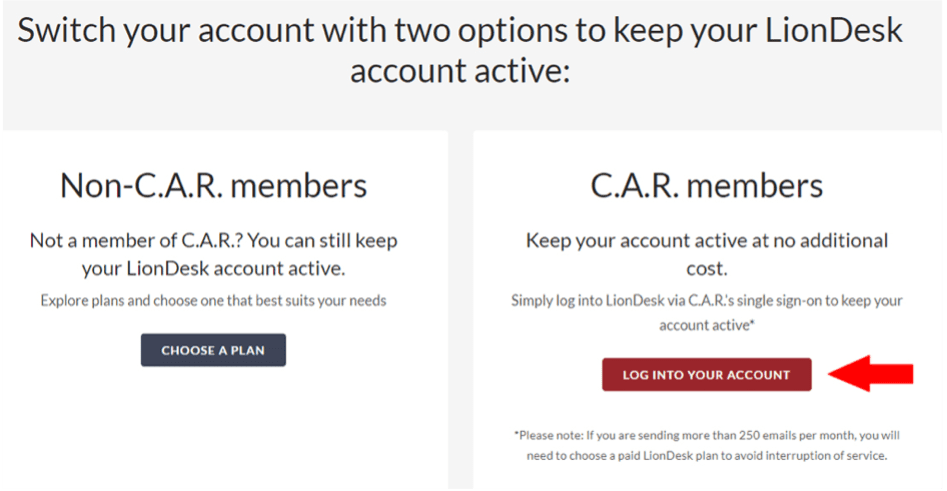
1. Visit the LionDesk website.

2. Click on the “LOG INTO YOUR ACCOUNT” button.

3. Log in to C.A.R. – Once you are logged in, it will automatically direct you to LionDesk. 

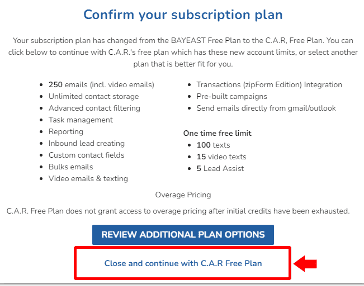
4. You will be prompted to “confirm your subscription plan” – At the bottom, you can click “Close and continue with C.A.R. Free Plan.”

This completes the transition of your Bay East account to C.A.R. Thank you and we appreciate your patience with the transition.

Posts navigation

Older posts
Newer posts

Recent Posts

  • ❉ November 2025 Market Statistics Available Now
  • ❉ Paragon MLS End-User License Agreement (EULA)
  • ❉ Paragon Database Maintenance – November 12
  • ❉ October 2025 Market Statistics Available Now
  • ❉ Offices for Lease at Bay East

Recent Comments

    Archives

    • December 2025
    • November 2025
    • October 2025
    • August 2025
    • July 2025
    • June 2025
    • May 2025
    • April 2025
    • March 2025
    • February 2025
    • January 2025
    • December 2024
    • November 2024
    • October 2024
    • September 2024
    • August 2024
    • July 2024
    • June 2024
    • May 2024
    • April 2024
    • March 2024
    • February 2024
    • January 2024
    • December 2023
    • November 2023
    • October 2023
    • September 2023
    • August 2023
    • July 2023
    • June 2023
    • May 2023
    • April 2023
    • March 2023
    • February 2023
    • January 2023
    • December 2022
    • November 2022
    • October 2022
    • September 2022
    • August 2022
    • July 2022
    • June 2022
    • May 2022
    • April 2022
    • March 2022
    • February 2022
    • January 2022
    • December 2021
    • November 2021
    • October 2021
    • September 2021
    • August 2021
    • July 2021
    • June 2021
    • May 2021
    • April 2021
    • March 2021
    • February 2021
    • January 2021
    • December 2020
    • November 2020
    • October 2020
    • September 2020
    • August 2020
    • July 2020
    • June 2020
    • May 2020
    • April 2020
    • March 2020
    • February 2020
    • January 2020
    • December 2019
    • November 2019
    • October 2019
    • September 2019
    • August 2019
    • July 2019
    • May 2019
    • April 2019
    • March 2019

    Categories

    • Bay East
    • Benefit
    • Event
    • Foundation
    • MLS
    • News
    • Uncategorized

    Meta

    • Log in
    • Entries feed
    • Comments feed
    • WordPress.org
    Bay East Association of Realtors logo Copyright 2021 © Bay East Association of REALTORS®
    • Privacy Policy
    • Terms of Service
    • DMCA Notice
    • Accessibility Assistance
    • Webmaster

    7021 Koll Center Parkway

    Pleasanton, CA 94566

    925 730 4060

    Get Directions »

    • Contact Us
    • Media Resources
    • Sitemap
    • Feedback
    Facebook Twitter Instagram Youtube Linkedin