
- Updating Disclaimer: The existing disclaimer will be updated to add additional protection for our members who add floor plans to their listings.
- Additional video links: Allowing more videos to showcase your listings, you may now add up to 10 unbranded embedded video links per listing within the Paragon listing entry screen. The video(s) will show up in Paragon Connect, ConnectView under REPORTS, Collab Center, and CollabLink (in email). You will find the embedded video field on the left column of the listing entry screen. View screenshots of the embedded video field.
- Status change for Coming Soon listings: Coming Soon Active listings can be updated to Pending directly to create an easier workflow for listing agents.
- Removal of Point Richmond: Point Richmond will be removed from the CITY field but remain in the AREA field to reflect more accurate information.
- Disclosures in listings: Data in Disclosures link will be removed within one day after status is changed to Sold, Expired, Canceled, and Withdrawn Temporary. A time-saving update for listing agents.
- Agent 2-Page (New): A new default report which accommodates all information of the listing and has bigger font for easier reading. Learn how to select any report to be the default of your own login.
- More information from MLSListings: Paragon will be importing all the AREA and School Districts from the South Bay system; making your property search more specific if necessary.
- Districts and Sub Districts from SFAR: Paragon will be importing all the Districts and Sub Districts from the San Francisco MLS; making your property search more specific if necessary.
Category: MLS
- Multi-Select Integrations available in Paragon Connect:
We’re happy to announce that users can select and take third-party actions on multiple records from Paragon Connect search results. By clicking the overflow menu, you can now see both System options and third-party integrations! Prior to this change, the only option available was Add to Cart
- Paragon Connect – Accessing your last five (5) searches:
Paragon Connect can now access your last five searches. This is synced with Paragon Classic, so the five searches you see are from either system.
The folder icon now opens a drawer instead of going directly to the load search dialog. The “Load Default Search” option has been moved to this location as well.
Another nice feature is you can either click on the criteria to load the search criteria in the search form, or you can click/tap on the arrow to go directly to the results.
Note: Accessing a class-based search from the hamburger menu will always load your default search.
- Preferred Phone number on Paragon Connect Detail Report
On the Paragon Connect detail report, the agent’s phone number displays the office or agent’s phone number based on a configuration. However, there is a user preference in Paragon Classic that allows users to choose which phone number to use for reports, which was being ignored by Paragon Connect. It has been updated to honor that preference. If a user chooses a phone number and checks “Display this phone number…” it will display the selected phone number on the Paragon Connect detail report.
- Collaboration Center – Change Search radius to an Input Field and Change Default to 1 mile/km
For Contacts who can create their own searches in Collaboration Center, they will now find the Address Search’s Radius field easier to use. We’ve removed the slider and switched it to an input field and changed the default amount from 5 miles to 1 mile. Users can input distances up to 50 miles/80 km.
- Collaboration Center – Consumer Mortgage Center
We have updated the mortgage calculator. This new tool can provide accurate real-time and historical rate trends for your client.
Review all of the enhancements here. Questions, please call our MLS Tech Support at 925.730.7100.
ShowingTime notified us that an extremely small percentage of ShowingTime text messages sent to Sprint (part of T-Mobile) customers are being blocked/filtered by T-Mobile/Sprint.
ShowingTime is following up directly for a resolution. We encourage you to download the ShowingTime mobile app which offers many more features than text messages, including instant “push” notifications. These notifications cannot be blocked and are impervious to SPAM filters and carrier issues, ensuring showing appointments and feedback is not missed.
Learn how to download and activate the ShowingTime Mobile App here.
It is imperative that you are using the correct bookmarks to access the system. Please make sure that you are using this URL as your bookmark https://maxebrdi.clareityiam.net/idp/login – If you are not using this URL as your bookmark, please update your bookmarks before May 10th. After May 10th, if your bookmark is not updated, you will get a “This site can’t be reached” notice.
The following are tips to update the bookmarks in popular browsers:
If you need any updating your bookmark, please call our MLS Tech Support at 925.730.7100
Effective April 27 a Security update will be activated on Supra lockboxes. If you do not have the current eKEY app on your device, you will be unable to open lockboxes and will be required to download the latest version from the App Store or Google Play.
If you need help, please contact Bay East Tech Support at 925.730.7100 or Supra Support at 877.699.6787.
Remaining consistent with C.A.R. Model MLS Rules, Bay East is adding two citable infractions enforcing COVID showing protocols effective May 24. Violations have been added for:
- using the term “Open House” – 12.10 False or Misleading Advertising
- agents failing to adhere to COVID showing protocols as outlined by listing agent – 12.2.1 Use of Lockbox Contents
A summary of the revised rules can be viewed here.
New Report
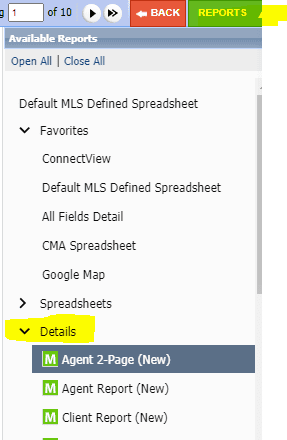
A new listing report named “Agent 2-Page (New)” will be added into Paragon. This report will accommodate all new fields being added into the system. See list of new fields below.
To access the new report, click on “Reports” – Click on the “Details” down arrow, Select the new report.
New Fields
1. Adding Accessory Dwelling Unit (ADU) fields within Paragon in Listing Input and Search
- ADU Bedrooms (Numeric)
- ADU Description (25 characters)
- ADU Bath (Numeric)
- ADU Baths Partial
- ADU Kitchen – Yes/No
- ADU Occupied – Yes/No
- ADU Building Type (Pick List = Attached, Detached)
- ADU Rents For
- ADU Sq. Ft. (Numeric)
- ADU Sq. Ft Source (Pick List = Appraisal, Builder, Measured, Other, Public Records)
- ADU Meter (Pick List = Main, Separate)
- ADU Main Entry Floor (Pick List = Lower, Street, Upper)
2. Adding an additional “Showing Field” called: Showing Schedule Link – This is a non-required field. User can add their preferred scheduling link within this field.
3. Adding “Primary Showing Contact” and “Primary Showing Phone.”
4. Adding 2nd Media Link.
Updating Existing Fields
1. Updating “Disclosures.IO” name to “HomeLight Listing Mngmt” under the Resources Tab
2. Changing the HOA field to allow searching by range instead of a single amount.
3. IO field changing to Disclosures, allowing you to add any disclosures link.
4. Updating “Master” to “Primary”; fields/features affected by this change are listed below.
Residential:
Feature selection
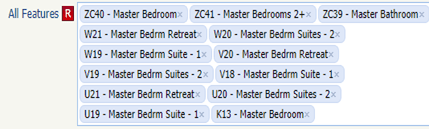
Feature field

Mobile Home:
Feature selection

Feature field

Lease Rental
Feature selection
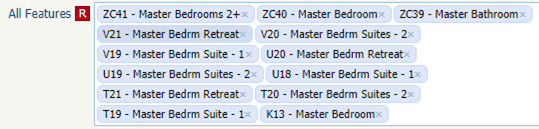
Feature field

5. Action Icons: The action icons within the reports will be moved under the “Actions Tab”.
The action icons currently found below the property pictures will be relocated to the “Actions” icon within the reports effective May 18.

The “Actions” icon is located above the picture and map.

If you have questions, please call Bay East MLS Tech Support at 925.730.7100.
Paragon Enhancement highlights:
- More control when sharing to Facebook: When sharing to Facebook from Paragon and Collaboration Center, you now have more control over where your posts will display on Facebook and the content of the post.
- Disable Contact Notifications when the primary email is removed: A message has been added, allowing the user to confirm changes if the primary email address has been removed for a contact who has automatic notifications enabled.
- Collaboration Center – Compare Workflow: The compare workflow is a feature that allows you and/or your client to compare listings side by side while in the Collaboration Center
- Expiring Notifications – Minor User Interface adjustments: Based on user feedback, we made a few changes to the new Expiring Notifications modal. The columns were rearranged to put the two action columns -Extended and Notifications (on/off) at the end of the row.
- Add Purge Date to Partial Listings Table: To assist you in tracking when your partial listings will be purged from the system, a new column has been added called Purge Date. It will calculate and display the date partial listings will be purged from the system.
Review all of the enhancements here. Questions, please call our MLS Tech Support at 925.730.7100.
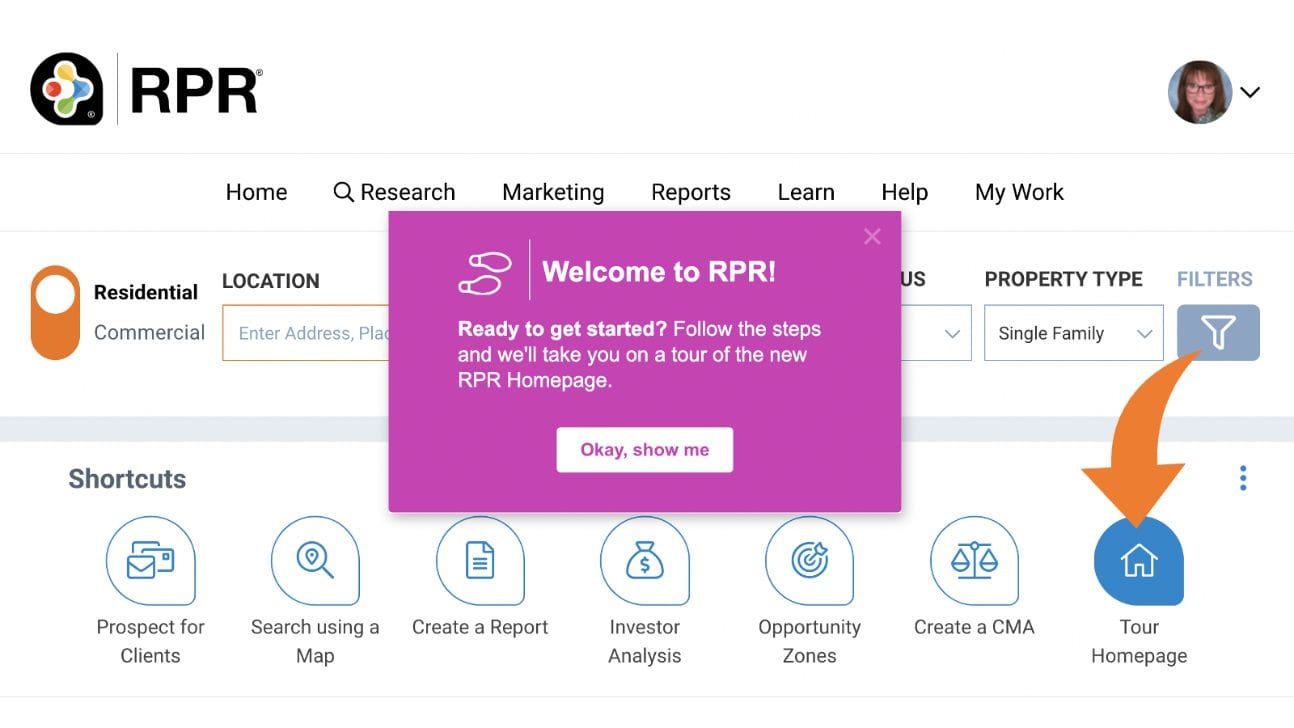
For REALTORS®, the redesigned RPR® site offers a more intuitive user experience, including eye-catching graphics, improved navigation, and self-guided shortcuts to help you perform tasks with ease. Log in to RPR® and click “Tour Homepage” for an overview of the significant changes.
Nothing will change with the disclosures service you know, but you will notice there is a new name and logo. Learn more here.