
New MLS Rules Effective January 1, 2026
California Assembly Bill 723 (AB 723) is intended to ensure that listing photos accurately represent the true appearance of a property and do not mislead buyers. The law does not prohibit photo editing; rather, it requires disclosure when images have been altered and the inclusion of unedited photos to clearly distinguish original from modified images.
To comply with AB 723, the MLS has added two new sections to the MLS Rules and Regulations, effective January 1, 2026. These sections explain what constitutes a digitally altered image and provide guidance on how such images must be handled and disclosed within the MLS.
11.5.1 Definition of Digitally Altered Images
“Digitally altered image” means an image, created by or at the direction of the real estate broker or salesperson, or person acting on their behalf, that has been altered through the use of photo editing software or artificial intelligence to add, remove, or change elements in the image, including, but not limited to, fixtures, furniture, appliances, flooring, walls, paint color, hardscape, landscape, façade, floor plans, and elements outside of, or visible from, the property, including, but not limited to, streetlights, utility poles, views through windows, and neighboring properties. “Digitally altered image” does not include an image where only lighting, sharpening, white balance, color correction, angle, straightening, cropping, exposure, or other common photo editing adjustments are made that do not change the
representation of the real property.
11.5.2 Digitally Altered Images
A Participant or Subscriber who submits any digitally altered image must also
(i) submit the original, unaltered version of the digitally altered image,
(ii) ensure that the original, unaltered version is displayed immediately after the digitally altered image, and
(iii) ensure that the digitally altered image is marked in a reasonably conspicuous manner as “altered,” “digitally altered,” or “AI altered.”
For (iii) when you upload the altered image, you follow the steps below or click here to watch a quick video.
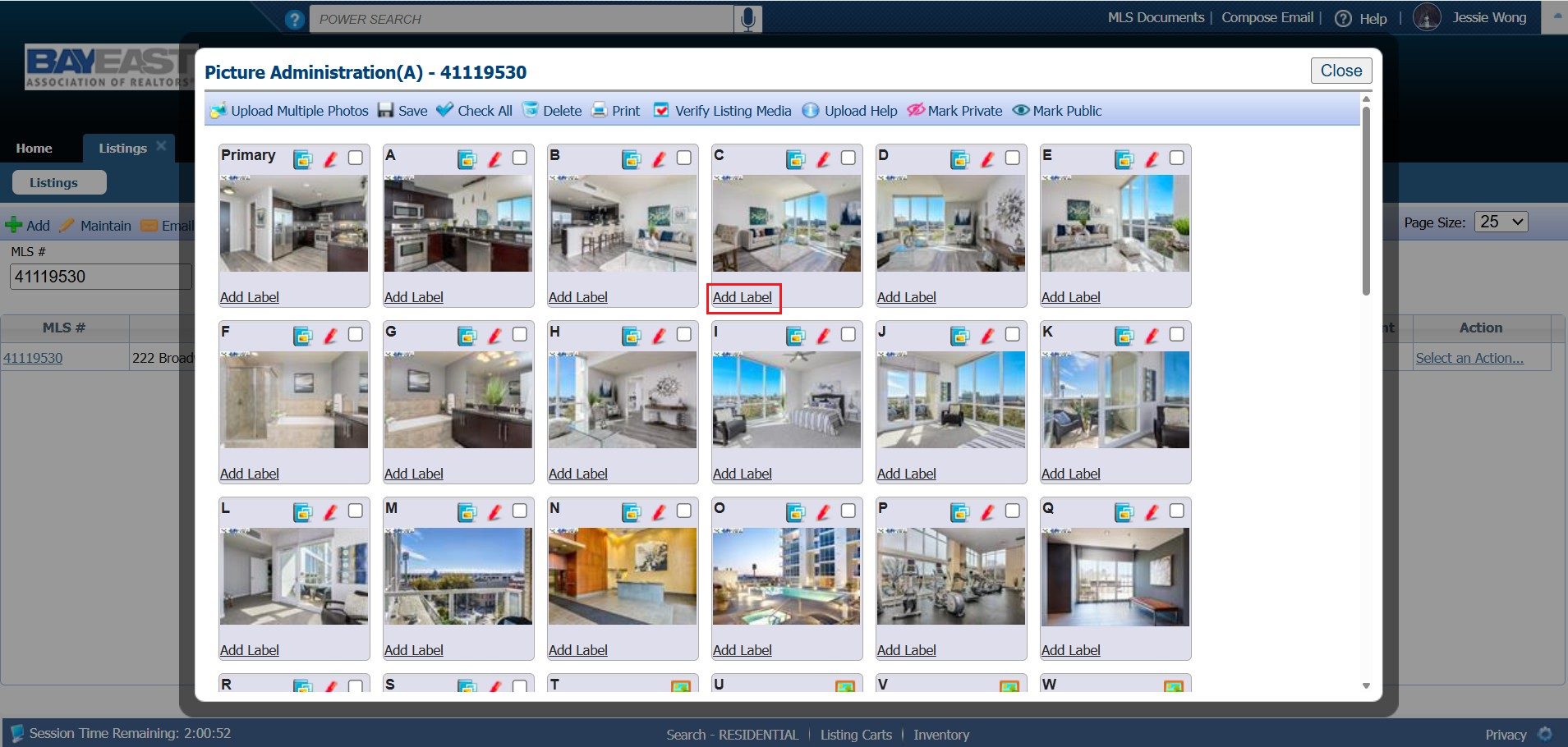
a) After uploading a photo, click on “Label” located directly beneath the image
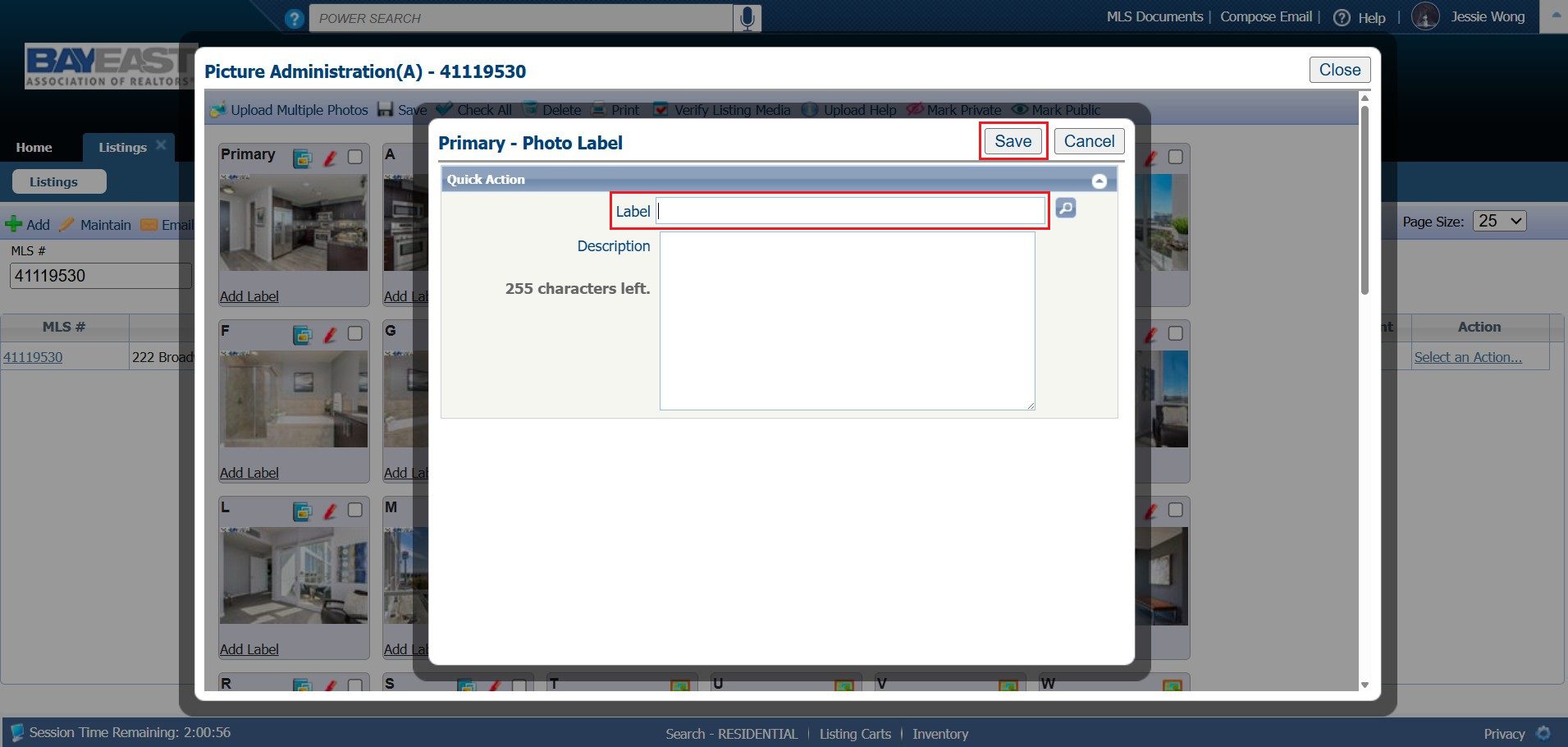
b) Enter the desired label text, then click Save. Examples of labels can be “Digitally Altered”, “Virtually Staged.”
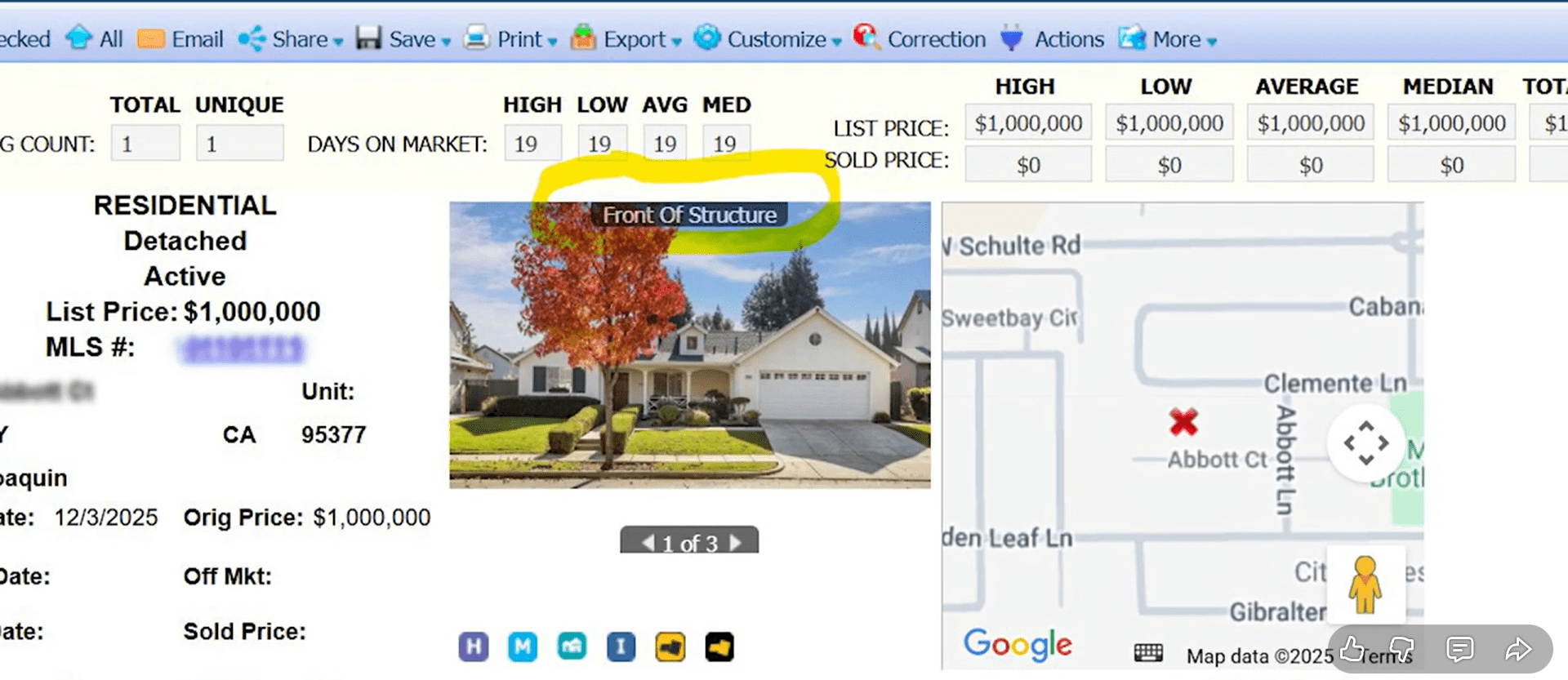
c) When viewing your listing, the label will appear as shown below.
11.5.3 Video Tutorial
Questions and Answers
Q: Are digitally altered photos allowed in the MLS?
A: Yes. Digitally altered photos are permitted, provided they are properly labeled and unedited photos are also included after the digitally altered image, in accordance with MLS rules.
Q: Do I have to label every photo in my listing?
A: No. Labels are required only for photos that have been digitally altered. Photos that are unedited do not require a label.
Q: What is considered a “digitally altered” image?
A: A digitally altered image is any photo that has been modified after capture in a way that changes or enhances the appearance of the property. This includes, but is not limited to, virtual staging, object removal, sky replacement, AI enhancements, or digital renderings. Please see the 11.5.1 Definition of Digitally Altered Images.
Q: Is virtual staging allowed?
A: Yes. Virtual staging is allowed, but virtually staged photos must be clearly labeled, and unedited versions of the photos must also be included where required.
Q: Do I need to upload both edited and unedited versions of a photo?
A: Yes. Ensure that the original, unaltered version is displayed immediately after the digitally altered image.
Q: What labels should I use for altered photos?
A: Labels should be factual and descriptive, such as:
- Digitally Altered Image
- Virtually Staged
- Digital Rendering
The label must clearly disclose that the image has been digitally altered.
Q: Where do I add the photo label in the MLS?
A: Labels are added directly to each photo within the MLS by clicking the “Label” option beneath the image and saving it.
Q: Can I edit or update photo labels after the listing is active?
A: Yes. Photo labels may be added or updated at any time to ensure compliance with MLS rules.
Q: What happens if I do not comply with the photo disclosure requirements?
A: Failure to properly label digitally altered images or include required unedited photos may result in an MLS compliance violation, subject to enforcement under the MLS Rules
and Regulations.
Q: Who is responsible for compliance, the agent or the photographer?
A: The listing agent and broker are responsible for ensuring all listing content complies with MLS rules, regardless of who created or edited the photos.
Q: Does this apply to listings entered before January 1, 2026?
A: Agents are encouraged to review active, Pending, and Hold status listings to ensure compliance.
Q: Why is the MLS requiring these disclosures?
A: These requirements are intended to promote transparency, ensure accurate representation of properties, and comply with California Assembly Bill 723.